Translated from the original Traditional Chinese post. Read the Chinese original →
Medium's Various Formatting Features
- Type ` and the text after it gets a gray background

- Type : and then some English, and emoji symbols pop up
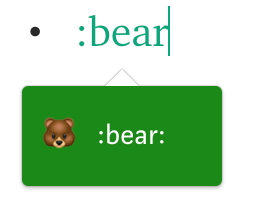
- Type ``` and a gray-background block appears (you have to type it at the very start)

- Press CMD+K on an image to add a Hyperlink to it
- Press *+space or 1. → to get indented formatting
- Type TK in the body → marks a body paragraph that isn't finished yet (a handy marker)
- All kinds of keyboard shortcuts
Medium Keyboard Shortcuts: Demo and Usage Notes (in Chinese)
- Image Grids (hold CMD when selecting images to pick several at once)


◆ ◆ ◆


Thoughts on this case? Leave a comment, a like, or a reaction below.
comments powered by Disqus